

Causes of Premature Plate Wear on a CI Flexo Printing Press
You‘re replacing plates too often. The cost is adding up—not just in materials, but in downtime and lost production. Premature plate wear is one of the most common—and most expensive—problems in flexo printing.
And it’s rarely caused by a single factor. More often, it‘s a combination of mechanical aggression, chemical degradation, and substrate abrasion. Your Flexo Printing Machine is capable of high-resolution printing at speeds up to 200m/min, but those capabilities come with demands on the plates. Understanding what’s wearing them out is the first step to stopping it.
This article walks you through the three main categories of plate wear: mechanical causes, chemical and environmental factors, and substrate-related abrasion. We‘ll also cover how to spot wear early, prevention methods that work, and how to build a plate life log for continuous improvement. For plate room supervisors and process engineers, this is practical knowledge for protecting your most expensive consumable.
Mechanical Causes – When the Press Damages the Plate
The press itself can be the source of plate damage. Here’s what to look for.
Excessive Impression Pressure
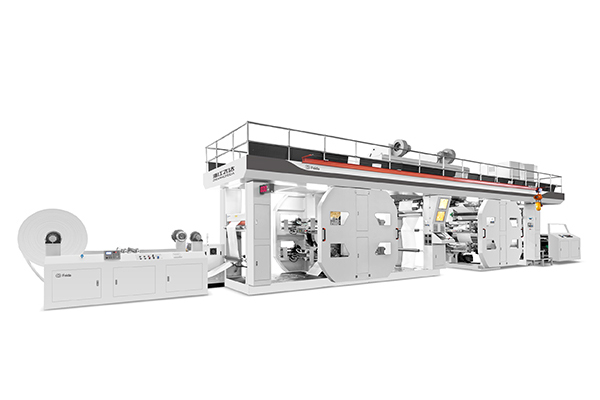
Impression pressure is the force that transfers ink from the plate to the substrate. Too much pressure, and you‘re not just crushing the printed image—you’re crushing the plate itself. The relief areas of the plate (the non-printing surfaces) get compressed and deformed. Over time, this leads to premature wear and reduced print quality. The pressure setting should be the minimum that achieves full ink transfer—no more. The CI flexo printing press’s central impression cylinder clamps the material for stable positioning, but pressure still needs to be set correctly.
Abrasive Anilox Rolls
The anilox roll transfers ink to the plate. If the anilox roll is dirty, worn, or damaged, its surface becomes abrasive. Instead of smoothly transferring ink, it acts like sandpaper against the plate surface. The result is accelerated wear, especially in the solid areas of the plate. Clean the anilox roll regularly and replace it when the surface shows signs of wear. Feida‘s CI flexo printing presses are built with high-quality components for reliability, but even the best components need regular maintenance.
High Web Tension Fluctuations
Web tension needs to be consistent. When tension fluctuates, the substrate slips or stretches against the plate. This creates micro-sliding—a constant, low-level abrasion that gradually wears down the plate surface. It’s not visible in a single print, but over thousands of impressions, it adds up. Check the tension controls and make sure the web path is clear of debris that could cause friction. The CI press’s central impression cylinder design helps maintain stable material positioning, but tension management is still an operator responsibility.
Chemical and Environmental Degradation
Not all plate wear comes from physical contact. Chemical and environmental factors are just as damaging.
Ink Solvent Attack
Photopolymer plates are formulated to resist solvents—but not indefinitely. Some solvent-based inks contain aggressive components that can soften or swell the plate surface. Over time, the plate becomes brittle and more susceptible to wear. If you’re using solvent-based inks, check compatibility with your plate material. Feida‘s flexo printing machines support a range of ink types and feature advanced automation for consistent application, but ink-plate compatibility is a question for your plate and ink suppliers.
Ozone Cracking
Ozone is a powerful oxidizer. It’s generated by corona treaters (used to treat film surfaces), electric motors, and even the printing process itself. Ozone attacks the polymer structure of the plate, causing microscopic cracks on the surface. These cracks spread over time, leading to plate failure. If your press has corona treatment, ensure the exhaust system is effective and that plates are stored away from ozone-generating equipment.
Poor Storage – Light and Heat
Photopolymer plates are sensitive to UV light and heat. Even after processing, residual photoinitiators can react to UV exposure, causing the plate to continue curing and becoming brittle. Storing plates near windows, fluorescent lights, or heat sources accelerates this process. Store plates in a cool, dark place—and use the protective sleeves they came in. Heat above 30°C (86°F) accelerates aging. The flexo printing machine’s automated functions include quick setting and switching, but plate storage practices are entirely in your control.
Substrate-Related Abrasion
The material you’re printing on can be the hidden cause of plate wear.
Coated vs. Uncoated Papers
Coated papers have a smooth, clay-based surface that’s gentle on plates. Uncoated papers—especially those with rough, open surfaces—act like fine sandpaper. The fibers are exposed and abrasive. If you‘re printing on uncoated stock, expect more plate wear. The flexo printing machine supports a variety of materials including paper, plastic film, and aluminum foil, but the wear characteristics vary significantly by substrate.
Mineral Fillers
Many papers contain mineral fillers—kaolin clay, calcium carbonate, or titanium dioxide—to improve brightness and opacity. These fillers are abrasive. When the substrate passes through the nip, the fillers grind against the plate surface. For high-filler papers, consider using a harder plate formulation or adjusting your plate replacement schedule.
Recycled Fiber Content
Recycled papers often contain more abrasive particles than virgin papers—not just mineral fillers, but also residual contaminants from the recycling process. If you’re running high-recycled-content stock, monitor plate wear more frequently and adjust your expectations for plate life.
Three Ways to Spot Plate Wear Early
Catching wear early saves time and money. Here are three practical methods.
Visual Inspection with Magnification
Use a magnifying glass or a plate inspection microscope to examine the plate surface. Look for rounding of the edges on fine lines, loss of definition on reversed text, and cracks or crazing on the plate surface. These are early signs of wear that aren’t visible to the naked eye. Feida‘s flexo printing machines support high-resolution printing effects, but the plates are what deliver that resolution—and they need to be in good condition to do it.
Print Quality Monitoring
Monitor print quality throughout the run. If you see dot gain increasing, fine lines disappearing, or solid areas becoming mottled, the plate may be wearing. Use a densitometer to measure solid ink density and dot gain at regular intervals. When you see a consistent decline, it’s time to change the plate.
Track Impression Count
Every plate has a finite life in impressions, not calendar days. Track the total impressions for each plate and compare it to the expected life for that substrate. If plates are consistently falling short of expectations, you have a problem to investigate. Feida‘s machines feature automated production functions and high-speed positioning, but plate life tracking is a management discipline.
Prevention That Actually Works
Prevention is always cheaper than replacement. Here’s what works.
Set Impression Pressure Correctly
The minimum pressure that achieves full ink transfer is the correct pressure. Use a pressure gauge or the machine‘s digital display to set it precisely. The CI flexo printing press’s advanced automation and control functions—including automatic positioning and quick setting—make it easier to set and maintain consistent pressure across runs.
Keep the Anilox Roll Clean
A clean anilox roll is a non-abrasive anilox roll. Implement a regular cleaning schedule that includes both chemical cleaning (for ink residue) and mechanical cleaning (for dried-in cells). The frequency depends on your production volume and ink type, but a clean anilox roll is essential for plate longevity.
Store Plates Correctly
Store plates in a cool, dark, dry place—away from UV sources and ozone-generating equipment. Use the protective sleeves that come with the plates, and keep them flat (not rolled) to avoid stress on the plate material. Proper storage is the easiest prevention method and the most often neglected.
Questions Plate Room Supervisors Ask
Is there a way to measure plate wear objectively?
Yes. Use a plate thickness gauge (a digital micrometer) to measure the relief depth of the plate at the start of its life and at regular intervals during use. A reduction in relief depth of more than 10-15% indicates significant wear. Also measure the solid density of the printed image—a drop of 0.15-0.20 density units from baseline suggests plate wear. These objective measurements help you make replacement decisions based on data, not guesswork.
Can I rotate plates between jobs to extend life?
Yes—but with caution. Rotating plates can help distribute wear, but only if the plates are compatible with the new job. A plate that’s worn on one type of substrate may wear faster on another. And plates that are stored between jobs need proper cleaning and storage. For high-volume operations, rotating plates is a common practice—but track the wear pattern on each plate to know when it‘s reached the end of its usable life. Feida’s flexo printing machines support quick setting and switching, making plate changes faster and reducing downtime.
Does plate hardness (Shore A) affect wear resistance?
Yes. Harder plates (higher Shore A values) are more abrasion-resistant but less ink-receptive and more prone to cracking. Softer plates (lower Shore A values) are more ink-receptive but wear faster. The right hardness depends on your substrate and application. For abrasive substrates like uncoated paper, use a harder plate. For smoother substrates, a softer plate may work. Feida‘s printing machines support high-quality requirements and can print on various materials, but plate selection should match the specific demands of each job.
Build a Plate Life Log
You can’t manage what you don’t measure. A plate life log turns guesswork into data.
What to Track
Record the following for each plate: plate identification number, substrate run, total impressions, print quality notes at start and end of the run, and the reason for plate removal. This data will show you which substrates cause the most wear, which plate materials last the longest, and whether your settings are optimized.
How to Use the Data
Review the log monthly. If you see that plates running on a specific substrate consistently fail at 50,000 impressions instead of the expected 80,000, you know there‘s an issue with the substrate or the settings. If plates are failing due to ozone cracking, consider improving ventilation. The log turns a collection of individual problems into a pattern you can solve.
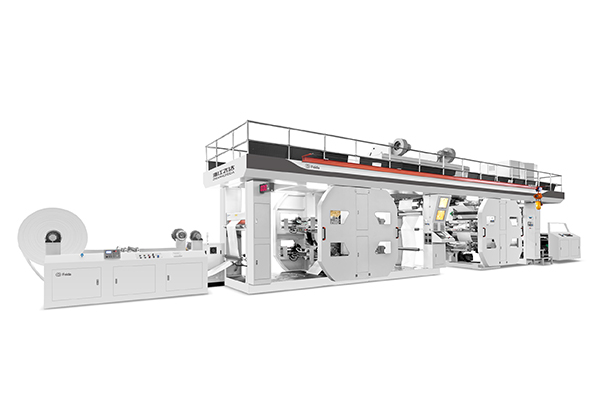
Feida Machinery has been manufacturing flexo printing equipment since 2010, covering an area of 20,000 square meters with the ability to produce more than 500 machines annually. Their CI flexo printing presses feature a central impression cylinder that clamps the material for stable positioning throughout the printing process, with printing color sets from 1 to 10 colors and support for various materials including plastic films, paper, and aluminum foil.
Feida has cooperated with listed packaging companies including KFC, McDonald‘s, Subway, and Starbucks, and exports to more than 70 countries with over 2,000 customers. The company provides comprehensive support including 24-hour online consultation, technical support, and spare parts availability—making them a partner you can rely on when you need to optimize your plate life and printing quality.
Premature plate wear is a solvable problem. Start by understanding the three categories of causes: mechanical, chemical, and substrate-related. Then implement the prevention methods that address your specific situation—correct impression pressure, clean anilox rolls, proper storage, and substrate tracking. Use the spotting methods to catch wear early, and build a plate life log to track and improve your performance over time. With the right practices and a reliable press like Feida’s CI flexo printing machine, you can extend plate life, reduce costs, and improve print quality across every job.
Ready to reduce plate wear on your CI flexo press? Reach out to Feida Machinery’s technical team—they can provide pressure setting guidance, anilox roll cleaning recommendations, and plate material compatibility advice to help you extend plate life and reduce costs.