

Why Your CI Flexo Printing Press Loses Register at High Speed
The job is running smoothly at 200 m/min. Then the production manager pushes for higher throughput: 350 m/min. Suddenly, the fine register you had dialed in starts drifting. By the time you reach full speed, what was a crisp, multi‑color print is now a blur of misaligned edges. Chasing register loss on a Flexo Printing Machine at high speed can consume hours of production time. The root causes are rarely mysterious: the central drum expands slightly under heat, web tension fluctuates unpredictably, the splice transfer shocks the system, or gear backlash accumulates across print stations. This guide takes you through a systematic diagnostic sequence that isolates the source before you start turning wrenches.
Two ways the central drum throws off register
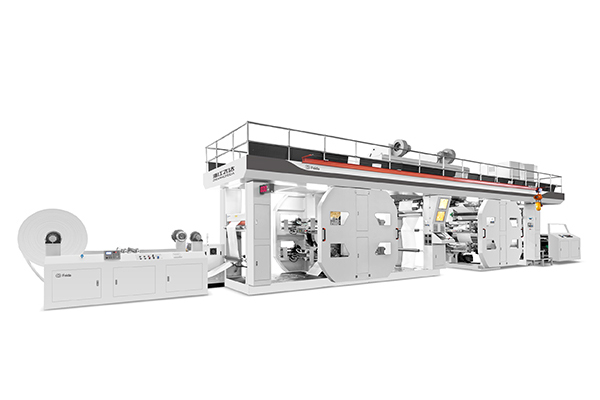
The CI press gets its name from the central impression cylinder that holds the substrate firmly during printing. Material wrapped around this drum experiences minimal web tension variation, which is why CI presses routinely achieve tighter register than stack‑type alternatives. The substrate is clamped by the central print cylinder, which ensures a very stable position of the printed material throughout the printing process. But that stability depends on two often‑overlooked factors.
Heat makes the drum grow
Over time—and especially during high‑speed extended runs—the central drum warms up. As the drum heats, its diameter increases slightly, changing the effective print circumference. On a long repeat job, this expansion can throw off the register between the first and last color stations. High‑grade alloy steel drums are precision‑machined and kept at a steady cool temperature to maintain radial runout extremely low. Many high‑end CI presses include chilled water circulation through the main drum to maintain temperature stability. Without active temperature control, the drum’s expansion directly translates into circumferential register drift.
A dirty or worn drum surface
Rubber deposits, dried ink residue, or uneven cleaning on the drum surface create localized friction changes. The web no longer moves uniformly across the drum face, causing the material to skew as it passes from one print station to the next. This effect is most noticeable when register loss is worse on one side of the web than the other, or when the problem appears suddenly after a cleaning that missed a spot.
Where web tension becomes the real problem
Fluctuations in web tension can cause the substrate to stretch or contract unevenly, leading to print elements shifting out of place between stations. Implementing robust web tension control is paramount, using high‑quality tension controllers, load cells, and dancer rollers to maintain consistent tension throughout the entire web path. On a CI press, the web path is relatively short, but tension variations at key transition points still disrupt register.
Dancer roller that over‑ or under‑reacts
The dancer roller compensates for speed mismatches between the unwind and the printing nip. If sensitivity is set too high, the dancer over‑corrects and introduces oscillation into the web. If sensitivity is too low, the dancer fails to absorb speed variations, and tension spikes travel directly into the print zone. The symptom of over‑sensitivity is a register that oscillates rhythmically at roughly one‑second intervals. The symptom of under‑sensitivity is a register that drifts slowly in one direction during acceleration and never fully recovers.
Splice shock that hits like a bump
In continuous production, the automatic turret unwinder splices a new roll onto the tail of the expiring one. The instant the splice passes through the dancer and into the infeed, the web experiences a tension surge. If the splice occurs at high speed, the register can shift enough to create an entire roll of misprinted material before stabilizing. The solution involves two adjustments: slow down the splice cycle (reduce the re‑acceleration ramp rate), and increase the overshoot compensation in the tension controller that anticipates the splice shock.
What happens when gears and couplings wear out
In a traditional mechanical‑shaft CI press, a single main shaft drives all color units through gears and couplings. Wear and deformation of components such as gears and linkages accumulate along the transmission chain, causing misregistration between color units. Gear wear, backlash, and temperature expansion cause small but cumulative registration errors. By the eighth color, a 0.02 mm error at station one has grown to 0.16 mm—enough to turn a fine line into a blurred edge.
Cumulative gear backlash
Each gear pair has a small amount of free play (backlash). When the press accelerates or decelerates, the direction of the load changes, and the gears shift from one side of the tooth to the other. This movement across multiple stations adds up. The most telling symptom is register that holds perfectly at constant speed but shifts immediately after any speed change—acceleration, deceleration, or even the micro‑speed variations caused by an unevenly wound roll.
Off‑center coupling
The coupling between the drive motor and the print cylinder may have slight angular or parallel misalignment. Under low torque at moderate speeds, the coupling flexes enough to absorb the misalignment. At high torque (high speed), the coupling becomes stiffer and transmits the misalignment as a once‑per‑revolution registration error. The symptom is a register error that repeats identically on every revolution of the print cylinder, visible as a consistent misregistration that follows the cylinder position. A high‑end CI press with individual servo‑driven printing units eliminates much of this wear by removing the mechanical transmission chain entirely.
| Cause | Symptom | Diagnostic Test | Corrective Action |
|---|---|---|---|
| Drum thermal expansion | Circumferential register drift increasing over run time | Log register error vs. run duration | Engage drum cooling; reduce speed |
| Uneven drum surface | Register worse on one web side | Mark drum with chalk; observe uneven wear | Thorough cleaning; re‑surface drum |
| Dancer over‑sensitive | Register oscillates (±0.2 mm) | Observe register trace during steady running | Reduce dancer gain setting |
| Splice shock | Register error spike at roll change | Note splice timing; measure register peak | Extend splice ramp time; add compensation |
| Gear backlash | Register shift after speed change | Accelerate stepwise; log register at each speed | Replace worn gears; consider servo upgrade |
| Coupling misalignment | Once‑per‑rev registration error | Mark cylinder position; check repeat error | Realign coupling; replace if worn |
A step‑by‑step way to find the real cause
When register loss appears, follow this workflow from simplest to most invasive.
First, clean the central drum thoroughly. Residue from previous jobs creates uneven traction. This single step resolves a surprising number of register complaints.
Second, check the dancer roller. With the press stopped, push the dancer through its travel. It should move smoothly without binding. If it hesitates or sticks, clean and lubricate the pivots. At speed, observe the dancer. It should oscillate gently, not bounce erratically.
Third, examine the splice cycle. Run a test at high speed and mark the register reading immediately before the splice and five seconds after. A spike exceeding the acceptable tolerance suggests the splice parameters need adjustment.
Fourth, inspect the gear train. Listen for irregular sounds at constant speed. A rhythmic clunk that repeats at the same frequency as the print cylinder rotation points to worn gear teeth. Check gear oil levels and contamination.
Fifth, evaluate the drive couplings. With the press stopped and isolated, grasp the print cylinder and attempt to rotate it by hand while holding the coupling fixed. Any perceptible rotational play indicates coupling wear.
Sixth, review servo tuning (if equipped). Poorly tuned PID settings cause slow drift or hunting. Inspect the servo tuning and loop stability for your production speed range and web mass.
Common questions about register stability
Q: Does substrate width affect register at high speed?
A: Yes. Wider webs are more susceptible to tension variations across the web width because any unevenness in roller parallelism or drum surface condition becomes magnified. A CI press running 800 mm wide material may show no register issues, while the same press at 1200 mm width reveals alignment problems in the web path. When increasing substrate width, verify that all idler rollers are parallel to the central drum within a tight tolerance.
Q: Can a bad print cylinder cause intermittent register loss?
A: Yes. A print cylinder that is not perfectly concentric, or a cylinder bearing that has developed play, will produce once‑per‑revolution register errors that come and go depending on load angle. Symptoms include register that is perfect on one revolution and off on the next, or a band of misregistration that rotates around the cylinder.
Q: How often should I recalibrate the register control system?
A: Perform a full calibration after any maintenance that disturbs the drive train, including gear replacement, coupling changes, or motor servicing. For ongoing operations, a quarterly calibration check is sufficient for most CI presses. High‑volume packaging converters may schedule monthly checks during peak seasons.
When it‘s time to call a specialist
If your internal troubleshooting confirms that the drive train shows excessive backlash or couplings are misaligned, and your press lacks individual servo drives, the repair may require factory support. Document your findings: which speeds trigger the problem, the pattern of register error (oscillating, drifting, or once‑per‑rev), and the results of the cleaning and tension adjustments. Feida Machinery‘s technical support team can review the data and recommend whether on‑site service is needed. Many CI presses have run for years with acceptable register, but high‑speed expansion of capacity can expose underlying wear that was not previously visible.
Why Feida CI flexo printing presses hold register better
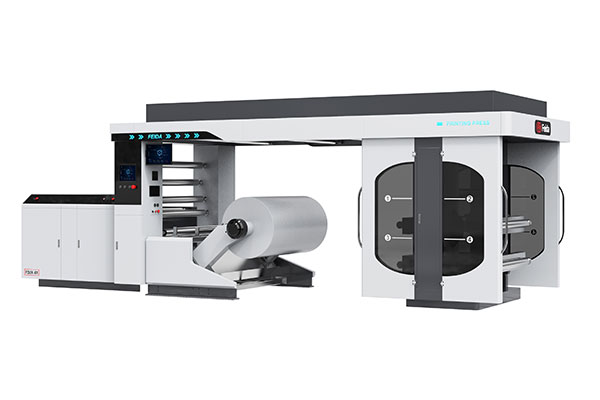
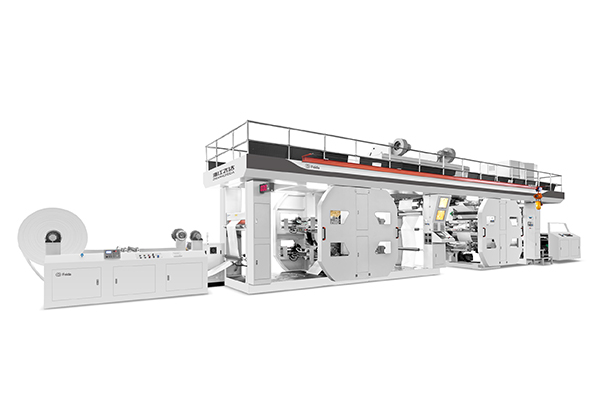
Feida Machinery designs its CI Flexo Printing Presses with high‑speed stability as a core requirement. The central drum is constructed from high-grade alloy steel, precision‑ground and dynamically balanced to maintain radial runout extremely low, keeping color‑to‑color registration tight even at elevated speeds. Individual servo‑driven printing units eliminate the mechanical transmission chain, removing gear backlash and coupling misalignment from the equation entirely. Feida offers a range of CI flexo presses—from 4‑color to 10‑color configurations—with widths up to 2200 mm and speeds reaching 400 m/min. Each press includes closed‑loop tension control with dancer feedback, an automatic turret unwinder with splice compensation, and user‑friendly register control software that stores job settings for rapid changeover. For converters facing register loss as they push existing equipment to higher throughput, a Feida press provides the thermal management, drive precision, and tension stability needed to run consistently at speed.
→ Request a quote from Feida Machinery for a CI Flexo Printing Press — Share your typical substrate, print width, number of colors, and target production speed. Their technical team can recommend the right press configuration with servo drive options to eliminate register loss at high speed.